
A Spanish writing and rewriting assistant rewords, corrects and changes the tone of Spanish text. Here’s what Grammarly, DeepL Write and others offer.
What a Spanish writing and rewriting assistant does
A checker only flags spelling, grammar and punctuation. A rewriting assistant goes further. It suggests new wording for a sentence or paragraph, shortens or expands text, and shifts the tone, for example from casual to formal. Some tools also translate or summarise, so you can draft in one language and polish in Spanish.
People usually want one of these jobs done:
- Tone: make a message more formal, professional, business-like or academic, or more friendly.
- Rewording: paraphrase a sentence or rewrite an article so it reads freshly but keeps its meaning.
- Summarising: cut a long text down to its main points.
- Translation then rewriting: translate English into Spanish, then smooth the result so it reads naturally.
Tools that rewrite Spanish, not only check it
The details below come from each maker’s own pages. No independent test compares how well these tools rewrite Spanish, so this is a list of what each one offers, not a ranking.
Grammarly
Grammarly is no longer English-only. It gives suggestions in Spanish and 23 other languages beyond English, and its help centre says multilingual suggestions are included in all plans: Free, Pro, Enterprise and Education. It supports paragraph-level rewrites in Spanish, French, Italian, German, Portuguese and Ukrainian, plus translation. It also has a free Spanish-language paraphraser, Parafrasear, which says it has no ads or hidden costs and asks users to cite their source and disclose that they used the tool.
DeepL Write
DeepL Write checks spelling, grammar and punctuation and lets you choose a writing style and tone to suit your audience. There is a “Corrections only” mode if you don’t want rewording, and you can click any word for alternatives or to rephrase the sentence. Spanish is on its language list, and DeepL’s language table shows text improvement for Spanish. It’s free to try, and custom style rules (“Customizations”) are a Pro feature.
LanguageTool
LanguageTool’s Spanish checker covers spelling, grammar, punctuation, capitalisation and style. The free version corrects spelling, simple punctuation and some style issues, and Premium shows all errors. Its AI paraphrasing tool works in Spanish and offers Formal, Academic, Concise, Fluent and Simple tones. It allows 3 free paraphrases a day and says “No personal data is stored”. In the checker, double-clicking a word shows synonyms. Add-ons cover browsers, Gmail, Google Docs, Word and desktop apps.
QuillBot
QuillBot’s paraphraser supports text in more than 25 languages, including Spanish. The current list is in the paraphraser’s language menu. Its help centre also covers modes, a Synonym Slider and Freeze Words, which keeps chosen words unchanged.
Gemini “Help me write” in Google Docs
Help me write in Google Docs works in Spanish, as well as English, French, German, Italian, Japanese and Portuguese. Its refine actions are Rephrase, Shorten, Elaborate, Bulletize, Summarize, More formal and More casual, so it covers both tone changes and summaries. You need an eligible Google Workspace or Google AI plan. In Gmail, “Help me write” and Proofread also work in Spanish, but Google says “Help me write” is only available in the US for personal Google accounts.
SpanishDict (translator and dictionary, not a rewriter)
The SpanishDict translator shows three machine translations side by side and lets you browse translations from Spain, Mexico or other Spanish-speaking countries. It’s useful for the translation step and for checking a word, but it doesn’t rewrite your text.
Which tool for which job
- Business or formal writing: LanguageTool’s Formal tone, DeepL Write’s style and tone choice, or More formal in Google Docs.
- Academic writing: LanguageTool’s paraphraser has an Academic tone. If you paraphrase sources, cite them, as Grammarly asks its users to do.
- Summarising: Summarize in Google Docs “Help me write”, if you have an eligible plan.
- Translate, then rewrite: compare translations in SpanishDict or use Grammarly’s translation, then polish the Spanish with Grammarly’s paragraph-level rewrites or DeepL Write.
- Quick change of tone for a message: LanguageTool’s paraphraser tones, DeepL Write’s style and tone choice, or More formal and More casual in Google Docs.
Comparison at a glance
| Tool | What it does for Spanish | Cost model (as the maker states it) |
|---|---|---|
| Grammarly | Suggestions, paragraph-level rewrites, translation; free Spanish paraphraser | Spanish suggestions on all plans, including Free |
| DeepL Write | Corrections, style and tone choice, rephrasing | Free to try; Write Pro is an add-on or included, depending on plan; customisations need Pro |
| LanguageTool | Checking, synonyms, paraphraser with Formal, Academic, Concise, Fluent and Simple tones | Free version; 3 free paraphrases a day; Premium shows all errors |
| QuillBot | Paraphrasing in 25+ languages, including Spanish | Check the maker’s site |
| Gemini in Google Docs | Help me write, rephrase, More formal, More casual, Summarize | Needs an eligible Google Workspace or Google AI plan |
| SpanishDict | Translation and dictionary lookups, regional translations; not a rewriter | Check the maker’s site |
Paid plan prices vary by plan and region, and the makers’ pages don’t list Australian dollar prices, so check the price in AUD at checkout.
How to rewrite Spanish well and check a tool’s output
A rewriter can quietly change register, regional forms or meaning. None of the makers’ pages cited here says whether it keeps tú or usted consistent, or whether you can choose Spain or Latin American Spanish when rewriting. Check these points yourself before you publish.
Pick a form of address and keep it
Spanish has three singular forms of “you” (tú, vos, usted) and two plural forms (vosotros, ustedes). FundéuRAE explains that usage varies by place: some parts of Spain use vosotros and others ustedes, some parts of the Americas use vos and others tú, and some areas, such as Colombia, use only usted. Decide who you’re writing for, then check that the rewrite doesn’t mix forms, for example “¿Puedes enviarlo?” in one line and “¿Puede usted enviarlo?” in the next.
Check accents (tildes)
The RAE’s Diccionario panhispánico de dudas sets the rules:
- Spanish uses only the acute accent (´): camión, never camiòn.
- Words stressed on the last syllable take a tilde when they end in -n, -s or a vowel (balón, café). Words stressed on the second-last syllable take one when they end in another consonant (clímax, hábil). Words stressed on the third-last syllable always take one (cántaro).
- One-syllable words take no tilde, except diacritic pairs: tú/tu, él/el, mí/mi, sí/si, té/te, dé/de, sé/se, más/mas.
- Question and exclamation words take a tilde, even in indirect questions: qué, cuál, quién, cómo, cuándo, dónde (“Dime quién lo hizo”).
- Solo and este, ese, aquel are normally written without a tilde; the RAE allows one only where the sentence would otherwise be genuinely ambiguous.
- Guion, hui, fie and rio are written without a tilde.
Check gender and number agreement
When a tool swaps a noun for a synonym, the adjectives must still agree with it. SpanishDict’s guide explains that adjectives ending in -o have four forms (alto, alta, altos, altas), while those ending in -e or -ista change only for number (grande, grandes; materialista, materialistas). For example, if “el trabajo terminado” becomes “la tarea”, the adjective needs to change too: “la tarea terminada”.
Watch for false friends
Translated or synonym-swapped text often slips in false friends. Common ones from SpanishDict’s list:
- embarazada = pregnant (embarrassed = avergonzado)
- actualmente = currently (actually = realmente)
- eventual = possible or temporary (eventual = definitivo)
- sensible = sensitive (the English word sensible = sensato)
- éxito = success (exit = salida)
- librería = bookshop (library = biblioteca)
- asistir = to attend (to assist = ayudar)
- carpeta = folder (carpet = alfombra)
- billón = trillion (billion = mil millones)
- compromiso = commitment (compromise = solución intermedia)
A quick checklist for any rewrite
- Read the original and the rewrite side by side, and confirm the meaning and facts haven’t changed.
- Check that tú, vos or usted, and vosotros or ustedes, stay consistent and suit your readers’ region.
- Check accents, especially diacritic pairs and question words.
- Check that adjectives agree with any swapped nouns.
- Scan for false friends, especially after translating.
- Cite your sources if you used a paraphraser, as Grammarly asks its users to do.
Rewriting Spanish articles with Article Insights
Re-writing articles can be a chore, but you can use the Article Insights re-writer to help you find synonyms and suggestions.
If you are using Article Insights to research and write Spanish content, you will be pleased to know that we have added a Spanish dictionary.
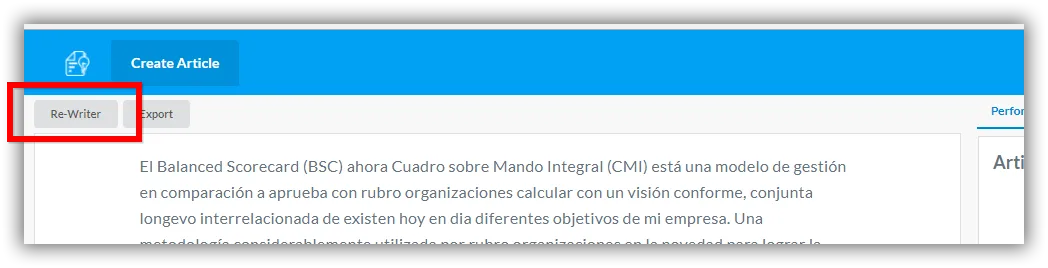
To use the re-writer, just click on the “Re-writer” button above your article.
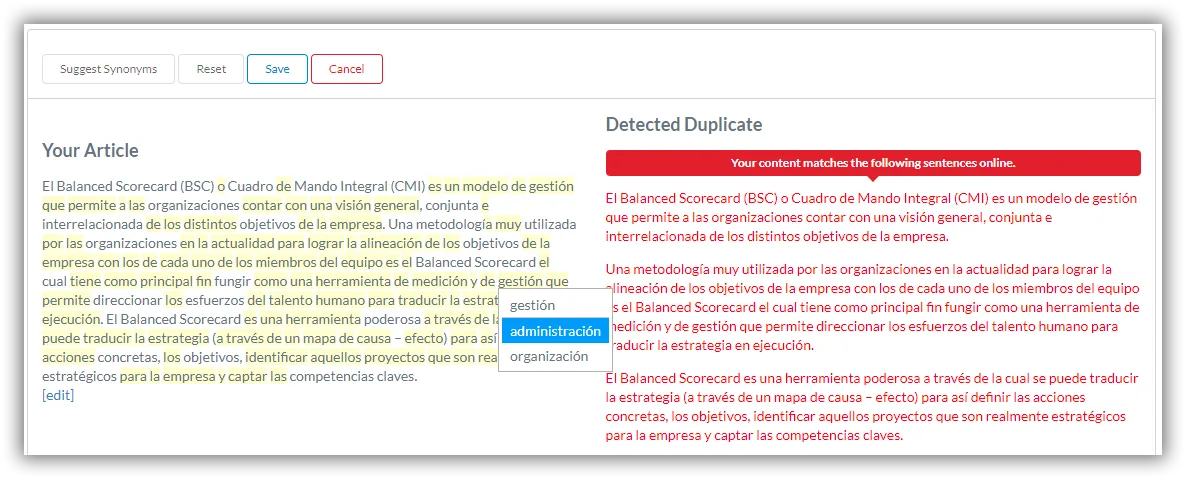
Article Insights will load the appropriate dictionary for your language, be it English or Spanish. After you swap in synonyms, run through the checklist above to make sure accents, agreement and register still hold.
Try out our Spanish article rewriter and let us know what you think.